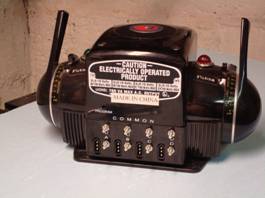
PWC or Modern ZW Controller chip replacement for

 Legacy Operations

from the Legacy Users Gathering Fall 2008

This procedure is only needed in cases were the ZW exhibits a shutdown similar to a “HALT” command being issued.  This is a ZW issue which Legacy exposed.  TMCC1 operations did not expose this issue.  If you are using the ZW controller and are not experiencing this issue then no change is needed.


It must be stressed that if you do not feel comfortable with opening up and working on your ZW, then please take it to a local service center.  This procedure is done at your own risk.


The procedure involves opening up the controller, removing the circuit board and replacing the chip in location U2.  These directions should give you an idea how this is done.  Although some folks can replace the chip without removing the circuit board, it can be very difficult and possibly cause the chip to be installed improperly if great care is not taken.  The chip I received from Lionel was marked ZWPC S01.HEX.  Contact Lionel service for the chip or in some cases they have sent out a whole new circuit board.


ZW1

Starting with the ZW controller, make sure it is disconnected from all power before beginning. The knurled nuts have already been removed and put in a safe place.  The tools I used for this repair included an 11/32 nut driver, a medium sized Phillips screwdriver, a small Flathead screwdriver and a small pair of needle nose pliers.  An ESD wrist strap is also recommended any time you work on electronics. It is very important to have a clean, well-lit area to work in.  I would also recommend a small container to hold the hardware that is removed for safekeeping.

ZW4

Using the Phillips screwdriver, remove the 4 screws on the top cover and set them aside.  Carefully remove the cover and place it out of harms way.  The circuit board is held in place by the terminals and supported by plastic retainers that hold the heat sink panels in place.

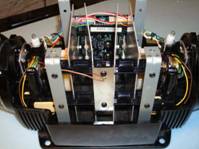
 This view is from the front of the controller and shows the heat sink supports and antenna.  The circuit board is in the background and the chip is visible just below the connectors.

ZW6

Take all the screws out of the top heat sink support including the screw on the antenna.  Remove the top support by gently twisting it up or down and sliding it out the side.  Remove the antenna’s bottom screw and carefully tuck it inside the case to the side.  Remove the remaining 2 screws on the lower support and removed it the same way as the upper supports.


All these screws are the same size so there is no need to worry about which go where.

ZW16


Next remove the 2 uprights closest to the circuit board.  The screws are on the bottom of the controller.  There is a nut, washer, and lock washer that will fall free inside the ZW for each upright.  Make sure you get them all out and account for them.  You may need to use your finger to keep the nut from spinning.  The nuts are not that tight and should break free with just the screwdriver.  Set the uprights to the side.

ZW17


Now remove the nuts on the terminals.  The 11/32 nut driver fits them.  Keep in mind that the supports for the heat sinks are no longer supporting them so take care in not moving or bumping them.  The circuit board assembly now has minimal support so continue carefully.

Next take care in removing the 2 control connectors and the antenna connector from the circuit board.  They’ll hang in place and you’ll have to be careful when the board is removed.  They’ll pretty much stay in place as to where they go when the time comes to reconnect them.

Carefully tip the heat sinks up and slide the terminals out of the holes.  Watch that the board doesn’t get caught on the wiring harness.  Also be very careful not to put too much pressure on the heat sinks.  You do not want to move them around or bump them.  They are attached to the board by components and do not have much support.

Click on image for larger version.

With everything out this is what you should have.  This is all the screws and parts that I removed to get the board out.  At this point you should have…


  • 4 screws for the cover.
  • 6 screws for the heat sink supports and antenna.
  • 2 heat sink supports.
  • 8 nuts for the terminals.
  • 2 uprights each with a screw, a washer, a lock washer, and nut.
  • The circuit board assembly with heat sinks.


Click on image for larger version.

Now look at the circuit board. Note the orientation of the chip and note the indent on the end of the chip (Red Arrow).  The new chip has to go in the same way.  You can damage the new chip if not inserted the same way. Carefully take the chip out of the socket. Gently use a very small flat screwdriver to pry it up from both ends a little at a time until it is completely loose. 


Install the new chip remembering the correct orientation (Indent matching with line on the circuit board).  Be careful to get all the pins in the socket.  You may need to bend them in a little.  I do this by putting one side on a hard service and apply slight pressure on the entire row of pins.  Take your time and do this a little bit at a time until the pins line up correctly with the socket.  If they are far off I usually bend each row a little rather than one row of pins a lot.


Once the new chip in installed and you have confirmed that all the pins are properly seated in the connector, re-install the board and heat sink assembly the same way it came out.  Tilt it back into place.  Put the nuts back on the terminals and tighten them being careful not to over do it.  Re-install the black supports for the heat sinks and the antenna.  Reconnect the 2 control connectors and antenna to the circuit board. 
Next is probably the hardest part, trying to get the uprights back in.  It’s a balancing act of getting the screw through the bottom, the upright on, and all the hardware back together.  Once the screw is through the bottom the upright goes first facing the same way as the others that were not removed. The washer is next, the lock washer and then the nut.  It takes a little patience but it’s not too bad.  A piece of tape over the screw might help keep it in place while putting the other hardware on. Tighten it all up.  Check all your connections; look for any possibly pinched wires.

Click on image for larger version.


Once all back together, before the top is back on this is what you should have.  Re-check your work. Make sure the antenna wire will be clear when you put the top on.  Carefully put the cover back on making sure the direction/whistle and bell buttons line up with their respective holes.  It should seat completely onto the bottom case.  You may have to align the uprights a little to get the screws in.  The holes in the uprights should be visible and not needing major aligning.  If they do they are not installed correctly.

This pretty much covers the chip replacement.  Be sure to take your time and check your work.  Make sure your new chip is oriented correctly and all the connections are restored.  Reconnect the ZW to your layout and you should be good to go.


It’s not a hard project and should take at most 1 hour if you really take your time.  No soldering is needed and just some basic mechanical skills are required.  In reality you could take this to your local service center or Lionel but I think it’s something that most folks can handle especially with some direction. 


That being said, I cannot stress this enough…


If you are NOT comfortable with this procedure let a service center or Lionel do the work.  

Lionel is not responsible for anything contained in this hand out.  

Lionel or I assume no responsibility for any damage that results.  All work is done at your own risk.